[This post, aimed at text editing aficionados especially in the Emacs and Vim camps, advocates using Emacs Evil in a configuration that replaces Evil Insert state with vanilla Emacs to gain the best of both Emacs and Vim editing styles. It also describes the very handy evil-execute-in-normal-state and its use from a vanilla Emacs editing state, to make the experience even more syncretic and seamless.]
Typos are incredibly common. How do you fix them?
For example, a common one I’ve noticed is in typing the name of an identifier in a programming language, like so:
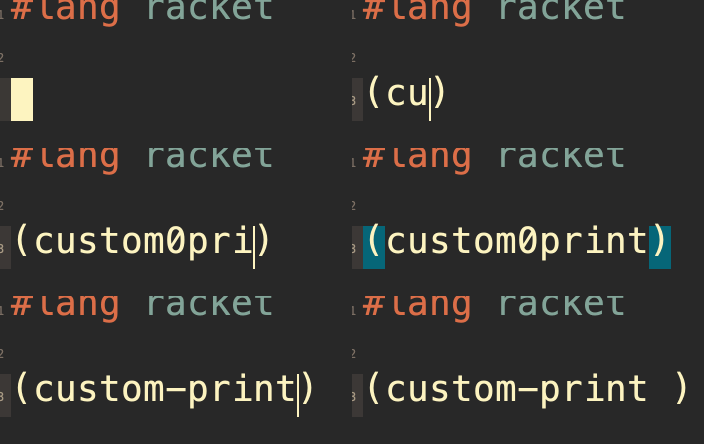
custom0print|… when I meant to type
custom-print|In Emacs, the only way I know of to fix this is to C-b repeatedly to get to the 0 and then C-d followed by - to replace it, and then return to the end using M-f or C-e [A commenter on Reddit suggested using C-r! — a much better option].
In Vim/Evil, you’d first Escape to Normal mode. Then you’d type F0 to find the 0 looking back from the cursor, and then r- to replace it with a dash. Then you’d return to editing at the end using something like ea or simply A.
I don’t love either of these approaches.
Emacs is tedious here [although C-r is great! And it makes the point this post is making, regarding the benefits of combining Emacs and Vim, even more definitively], but it is at least simple and thus keeps you focused on the subject matter. And while Vim/Evil is elegant, escaping to Normal state to perform this minute edit and then returning to where you were before loses “tempo,” causing you briefly to focus on something else than your subject matter. It is a cost that is especially felt for minute edits (for larger edits, escaping to Normal state is perfectly fine as the edit does require your attention).
The good news is, we can combine them for the best of both worlds.
Here’s how I do it:
- Replace Insert state with vanilla Emacs.
  ;; Use Emacs keybindings when in Insert mode }:)
  (setcdr evil-insert-state-map nil)
As vanilla Emacs is designed to be a standalone editing paradigm, I find it generally more useful and powerful than Evil Insert state.
- Bind
evil-execute-in-normal-stateto a convenient key (I useC-;. By default, Evil Insert state usesC-o, but Emacs’sC-ois very useful, so it’s better to overrideC-;which is perhaps even easier to type as it’s in home position).
  (define-key
    ;; Insert mode's "C-o" --- roundtrip to Normal mode
    evil-insert-state-map
    (kbd "C-;")
    #'evil-execute-in-normal-state)
Now you can use C-; to enter a Normal command which of course in this case is F0. You remain in Emacs state, allowing you to C-d - and then return with M-f or C-e or whatever fits the specific case, without leaving the insertion state, keeping you focused on the task at hand and preserving your flow. This approach thus gains the efficiency of the Evil solution while still feeling light.
The C-; you’ve now bound is very handy, and this is just one example of its use. It is useful in any situation where you want to do a quick edit somewhere else without losing tempo. In such cases, Vim allows you to describe your edit in a natural editing language, while Emacs keeps you in the flow. You’d like to momentarily use the description language but otherwise keep doing what you’re already doing. As it happens, even aside from tempo considerations, in many cases using this approach is more efficient than either Emacs or Evil on their own.
Now, if you’re a purist Vim or Evil user, don’t worry! This isn’t blasphemy but is a feature that’s part of Vim itself! Evil, like Vim, bounds your edits as you would expect, so that it is functionally identical to explicitly escaping, editing, and re-entering Insert state.
My Vim tip on Living the High Life elaborates on this.
Do you use Emacs and Evil together for the best of both? What are your favorite tricks?